What Is the Smigo App?
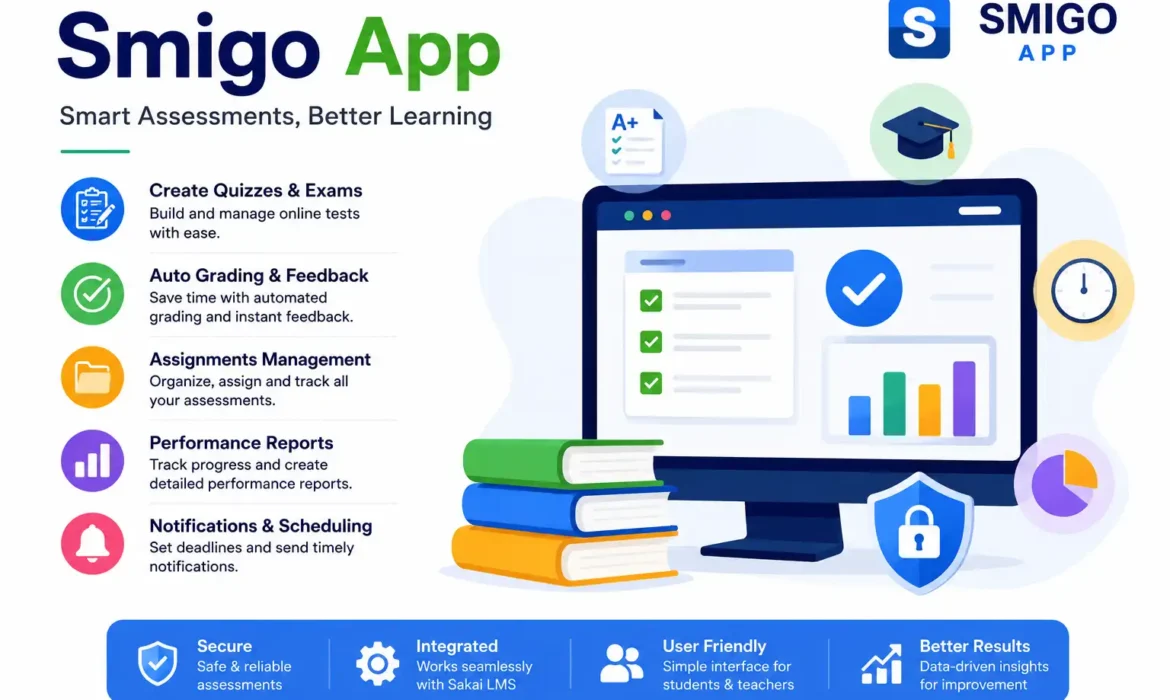
The Smigo App, often associated with Samigo, is an online assessment and testing solution designed for educational institutions using the Sakai Learning Management System (LMS). It helps instructors create quizzes, exams, surveys, and assignments while giving students a secure platform to complete assessments digitally. Instead of relying on paper-based evaluations, educators can manage everything from one dashboard. As e-learning continues to grow worldwide, digital assessment tools like Smigo support faster grading, improved student engagement, and more efficient course management. Its flexible features make it suitable for schools, colleges, universities, and professional training programs.
How Does the Smigo App Work?
The Smigo App functions as an assessment module within the Sakai LMS, allowing educators to design, schedule, and manage online evaluations from a centralized platform. Teachers can create different question formats, assign deadlines, automate grading, and review student performance through detailed reports. Students simply log in using their institution’s credentials to access quizzes, assignments, and exams. The platform stores results securely while integrating grades directly into the course gradebook. This streamlined workflow reduces administrative work and helps educators spend more time improving learning outcomes.
Top Features of the Smigo App
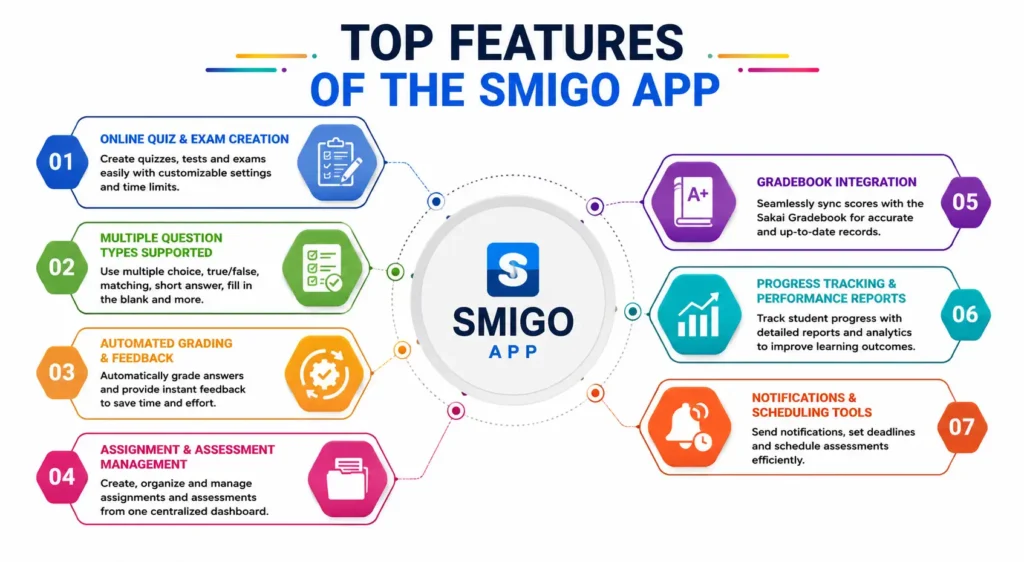
The Smigo App includes a wide range of features that simplify online teaching, learning, and assessment management. From creating quizzes to tracking academic progress, every tool is designed to improve efficiency for both educators and students. The platform combines automation, reporting, secure assessments, and seamless integration with Sakai LMS, making it a practical solution for modern digital classrooms. These features help institutions deliver consistent learning experiences while reducing manual tasks and improving overall academic performance.
Online Quiz and Exam Creation
Smigo enables instructors to create online quizzes, practice tests, and final examinations with customizable settings. Teachers can set time limits, randomize questions, define scoring rules, and schedule availability dates. This flexibility supports fair assessments while reducing administrative effort and ensuring a smooth testing experience for students across different courses.
Automated Grading and Feedback
Automatic grading instantly evaluates objective question types, providing students with quick results and reducing instructor workload. Teachers can also configure personalized feedback, correct answers, and explanations. According to educational research, timely feedback significantly improves learning retention and student performance by helping learners identify and correct mistakes sooner.
Assignment and Assessment Management
Smigo allows educators to organize assignments, quizzes, and exams from a single interface. Teachers can publish assessments, monitor submissions, adjust deadlines, and manage grading without switching between multiple tools. This centralized workflow improves productivity while maintaining consistency across different courses and academic programs.
Gradebook Integration
Assessment scores automatically synchronize with the Sakai Gradebook, eliminating manual grade entry and reducing the risk of errors. Educators can monitor student progress more efficiently, while learners gain immediate access to updated grades, making academic performance tracking transparent and easier to understand.
Progress Tracking and Performance Reports
Smigo provides detailed analytics that help instructors evaluate student participation, quiz scores, completion rates, and overall learning progress. These reports make it easier to identify struggling learners, measure class performance, and make data-driven teaching decisions that improve educational outcomes over time.
Notifications and Scheduling Tools
Built-in scheduling and notification features help instructors announce upcoming quizzes, assignment deadlines, and exam availability. Students receive timely reminders that reduce missed submissions and improve course participation. Organized scheduling also supports better time management for both educators and learners.
Key Benefits of Using the Smigo App
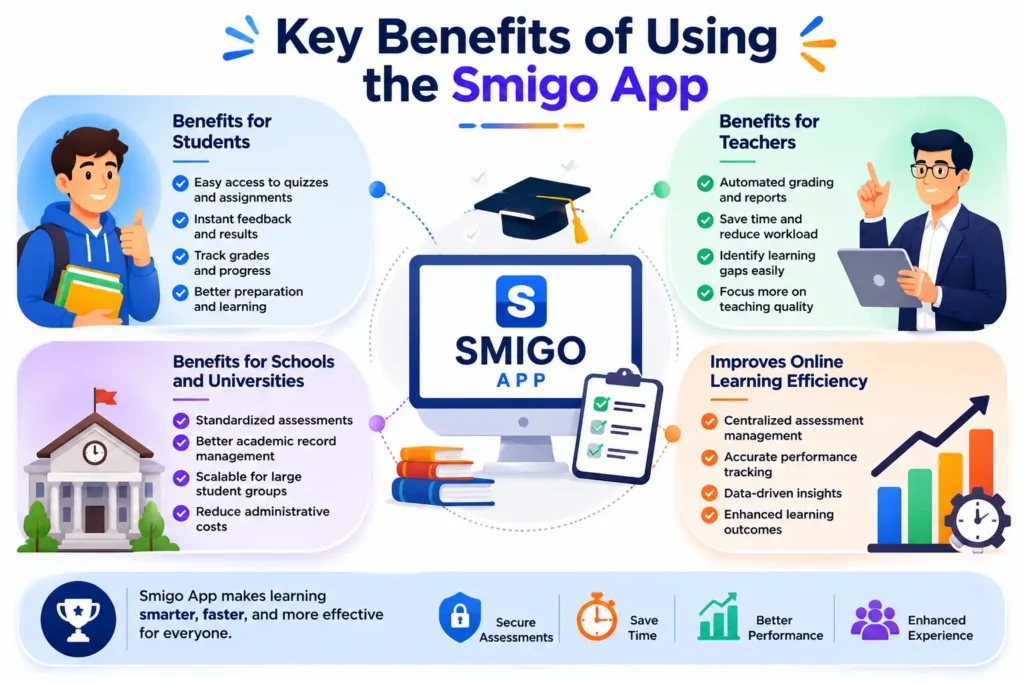
The Smigo App delivers measurable benefits by simplifying assessment management while improving the learning experience. Educators save time through automation, students receive faster feedback, and institutions gain a more organized digital assessment system. Research from the EDUCAUSE Horizon Report highlights that learning analytics and digital assessment technologies help institutions make more informed educational decisions and improve student success. By combining automation, reporting, and secure online testing, Smigo supports modern teaching practices while increasing efficiency, accuracy, and learner engagement across educational environments.
Benefits for Students
Students enjoy a simple interface that makes accessing quizzes, exams, and assignments convenient from any supported device. Instant feedback, organized schedules, and easy grade tracking help learners monitor their academic progress. These features encourage better preparation, increased engagement, and continuous improvement throughout each course.
Benefits for Teachers and Instructors
Teachers reduce repetitive administrative work through automated grading, centralized assessment management, and integrated reporting tools. They can focus more on teaching quality, curriculum improvement, and personalized student support instead of manual grading. Performance analytics also help instructors identify learning gaps more effectively.
Benefits for Schools and Universities
Educational institutions benefit from standardized assessments, improved academic record management, and scalable digital learning infrastructure. Smigo supports consistent evaluation processes while reducing paperwork and administrative costs. Centralized reporting also helps departments monitor academic performance and maintain institutional quality standards more efficiently.
How It Improves Online Learning Efficiency
Smigo improves online learning by combining assessments, grading, reporting, and scheduling within a unified platform. Students spend less time navigating multiple systems, while instructors manage courses more efficiently. Research from UNESCO has consistently emphasized that well-designed digital learning environments enhance accessibility, flexibility, and educational continuity across diverse learning settings.
🌟 Recommended for You: How to Start a Marketing Agency in 2026 | Best Guide
Smigo App Use Cases
The Smigo App is designed to support a variety of educational and training scenarios, making it more than just an online testing platform. Whether it’s conducting classroom quizzes, managing assignments, or delivering remote learning assessments, the platform helps organizations streamline evaluation processes. Its integration with the Sakai Learning Management System makes it especially valuable for universities and institutions that require secure, scalable, and data-driven assessment solutions. From higher education to corporate training, Smigo enables instructors and administrators to deliver consistent learning experiences while improving productivity and learner engagement.
Online Exams and Quizzes
Smigo allows educators to create secure online exams, practice tests, and timed quizzes for any subject. Features like question randomization, automatic grading, and controlled availability help reduce academic dishonesty while simplifying exam management. Students can complete assessments digitally, making the testing process faster and more convenient.
Classroom Assessments
Teachers can use Smigo to conduct regular classroom assessments without relying on paper-based tests. Short quizzes, weekly evaluations, and formative assessments help instructors measure student understanding throughout the course. Immediate scoring and performance reports enable faster instructional adjustments and continuous academic improvement.
Distance and Remote Learning
As online education continues to expand, Smigo supports remote learning by providing a secure environment for digital assessments. Students can complete quizzes and assignments from virtually any location while instructors monitor participation and performance. This flexibility helps institutions maintain educational continuity regardless of physical classroom access.
Homework and Assignment Management
Smigo simplifies homework distribution and assignment tracking through a centralized dashboard. Educators can publish tasks, set submission deadlines, review completed work, and provide feedback without using multiple platforms. Students benefit from organized schedules, making it easier to manage coursework and meet academic deadlines.
Employee and Training Assessments
Beyond education, organizations can use Smigo to evaluate employee knowledge during onboarding, compliance programs, and professional development courses. Trainers can create certification exams, monitor learning progress, and generate performance reports. This makes the platform suitable for structured workplace learning and skills development initiatives.
Smigo App Pros and Cons
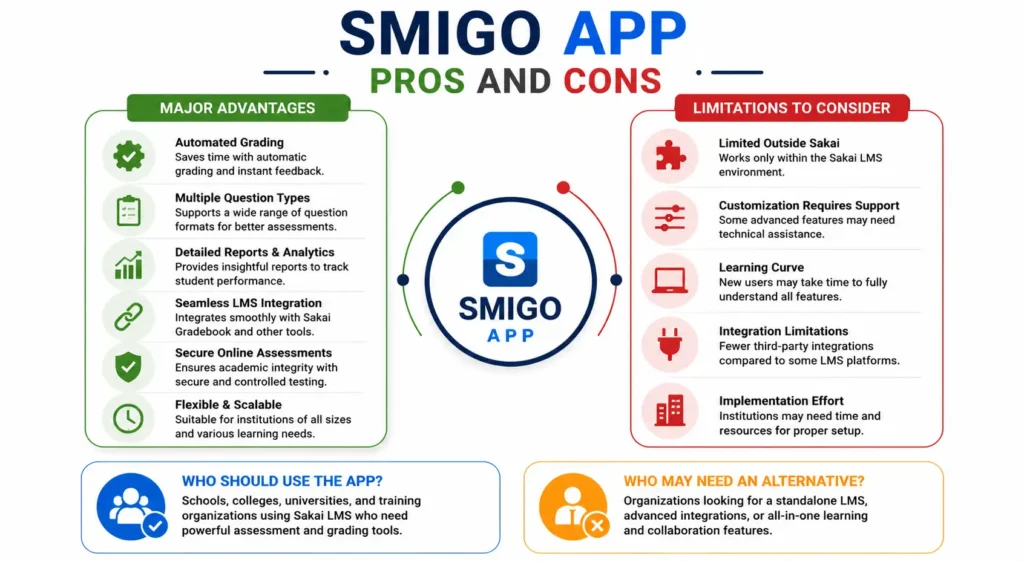
Like any learning management solution, the Smigo App offers strengths and limitations depending on an organization’s needs. Its assessment-focused design, automation, and Sakai integration provide significant value for educational institutions. However, users should also consider technical requirements, institutional support, and compatibility before implementation. Evaluating both the advantages and drawbacks helps educators choose the right platform for their teaching environment while ensuring it aligns with their learning objectives, infrastructure, and long-term digital education strategy.
Major Advantages
Smigo offers automated grading, multiple assessment formats, detailed reporting, and seamless Sakai Gradebook integration. These features reduce instructor workload while improving assessment accuracy. The platform also supports secure online testing, flexible scheduling, and scalable course management, making it suitable for institutions of different sizes.
Limitations to Consider
Smigo primarily serves organizations using the Sakai Learning Management System, limiting accessibility for users outside that ecosystem. Some advanced customization features may require administrator support or technical knowledge. Institutions already using another LMS may face migration challenges during implementation.
Who Should Use the App?
Smigo is best suited for universities, colleges, schools, training centers, and organizations that rely on Sakai for online learning. Instructors managing frequent assessments, certification programs, or large student groups can benefit from its automation, reporting capabilities, and efficient assessment management tools.
Who May Need an Alternative?
Organizations that require standalone learning platforms, advanced collaboration features, or broader third-party integrations may prefer alternatives. Businesses seeking comprehensive employee learning management beyond assessment delivery might also evaluate other LMS platforms that offer expanded content management and communication features.
🌟 Recommended for You: How to Keep Your Blog Updated for Better SEO
Smigo App vs Other Learning Management Systems
Choosing the right learning management system depends on institutional goals, teaching methods, and technical requirements. While Smigo focuses heavily on assessment management within Sakai, other platforms provide different strengths in course delivery, collaboration, and content management. Understanding these differences helps educators select a solution that matches their instructional needs. The comparison below highlights how Smigo performs against several of the most widely used learning management systems in education today.
Smigo App vs Moodle
Both Smigo and Moodle support online assessments, but they serve different purposes. Smigo functions as an assessment tool within Sakai, whereas Moodle is a complete open-source learning management system. Moodle provides broader course management capabilities, while Smigo delivers a streamlined assessment experience for Sakai users.
Smigo App vs Canvas LMS
Canvas LMS offers modern course management, multimedia learning, and extensive third-party integrations. Smigo focuses more specifically on assessment creation and grading inside the Sakai ecosystem. Institutions already using Sakai may find Smigo more practical, while Canvas is often preferred for its broader learning environment.
Smigo App vs Google Classroom
Google Classroom emphasizes assignment sharing, communication, and collaboration using Google Workspace. Smigo provides more advanced testing capabilities, including question randomization, secure assessments, automated grading, and detailed reporting. Educational institutions requiring structured examinations often need features beyond Google Classroom’s assessment tools.
Which Platform Is Better for Online Assessments?
The best platform depends on your institution’s infrastructure and learning objectives. For organizations already using Sakai, Smigo provides excellent assessment management through seamless integration and automated workflows. Institutions seeking a complete learning management ecosystem may prefer Moodle or Canvas, while schools focused on simple classroom collaboration often choose Google Classroom. Selecting the right platform ultimately depends on assessment complexity, scalability, budget, and existing educational technology.
🌟 Recommended for You: How to Choose a Website for Backlinks (SEO Guide)
How to Get Started with the Smigo App
Getting started with the Smigo App is straightforward for institutions using the Sakai Learning Management System. Since Smigo functions as an integrated assessment tool rather than a standalone application, users typically receive access through their school, university, or organization’s learning portal. After logging in, instructors can create assessments, manage grades, and monitor student performance, while learners can access quizzes and assignments from a centralized dashboard. Following a few simple steps helps users take full advantage of the platform’s assessment and learning management capabilities.
How to Access the Platform
Users access Smigo through their institution’s Sakai LMS portal using a web browser. After signing in with assigned credentials, they can navigate to the course dashboard where quizzes, assignments, and assessments are available. Access permissions depend on the user’s role, such as student, instructor, or administrator.
Login Requirements
To use Smigo, users generally need an active institutional account provided by their school, university, or organization. Login credentials are managed by the institution’s IT or LMS administrator. Since Smigo is integrated with Sakai, separate account registration is usually unnecessary for authorized users.
Creating Your First Assessment
Instructors can create an assessment by selecting the assessment tool within Sakai, adding questions, configuring grading options, setting time limits, and publishing the quiz. Smigo supports multiple question formats and scheduling features, allowing educators to build assessments that match their teaching objectives and course requirements.
Tips for Students Taking Online Tests
Students should review assessment instructions carefully, ensure a stable internet connection, and use a compatible web browser before beginning an online test. Logging in early, avoiding distractions, and checking submission confirmations can help prevent technical issues while improving the overall testing experience.
Best Practices for Teachers
Teachers should organize assessments with clear instructions, balanced question types, and realistic time limits. Using randomized questions, automated feedback, and performance reports helps improve assessment quality while supporting academic integrity. Reviewing analytics after each assessment also helps identify learning gaps and improve future instruction.
Frequently Asked Questions
What is the Smigo (Samigo) App used for?
The Smigo App is primarily used to create, manage, and evaluate online quizzes, exams, surveys, and assignments within the Sakai Learning Management System.
Is Smigo a standalone mobile app?
No. Smigo is generally recognized as the assessment component of the Sakai Learning Management System rather than a standalone consumer mobile application. Users typically access it through their institution’s Sakai portal using a supported web browser.
Can anyone use the Smigo App?
Access is usually limited to students, instructors, and staff whose educational institution or organization uses the Sakai LMS. Individual users cannot typically create independent accounts without authorization from the institution managing the learning platform.
Is the Smigo App free?
For students and instructors, access is generally included through their institution’s Sakai implementation. Educational organizations may incur costs related to hosting, maintenance, customization, or technical support, depending on how their Sakai environment is managed.
Which devices support the Smigo App?
Smigo works on most modern desktops, laptops, tablets, and smartphones through compatible web browsers. Since it operates within the Sakai LMS, users can access assessments from Windows, macOS, ChromeOS, Android, and iOS devices with internet connectivity.
Is the Smigo App available on Android or iPhone?
There is no widely distributed standalone Smigo application available on Google Play or the Apple App Store. Mobile users generally access the platform through their institution’s Sakai website using a mobile browser or supported institutional application.
How secure are online exams in Smigo?
Smigo includes several security features such as authentication, timed assessments, question randomization, controlled availability, and secure grade management. Institutions may also implement additional security measures depending on their Sakai configuration and academic integrity policies.
What types of questions can instructors create?
Instructors can create multiple-choice, true or false, matching, fill-in-the-blank, short answer, essay, and other assessment question types. This flexibility enables educators to evaluate factual knowledge, critical thinking, problem-solving, and written communication skills effectively.
Does Smigo integrate with other educational tools?
Yes. Smigo integrates directly with the Sakai Learning Management System and works alongside course management features such as Gradebook, Assignments, Announcements, and user management. Available integrations may vary depending on the institution’s Sakai implementation and installed plugins.
Is the Smigo App suitable for businesses or only educational institutions?
Although primarily designed for educational institutions, Smigo can also support employee training, certification programs, compliance assessments, and professional development. Organizations using Sakai for workplace learning can leverage its assessment features to evaluate employee knowledge and track training progress efficiently.
Introduction
Online learning has transformed the way educational institutions deliver courses, evaluate student performance, and manage academic assessments. As digital education continues to expand, reliable assessment platforms have become essential for maintaining efficiency and academic integrity. The Smigo App, commonly associated with Samigo in the Sakai Learning Management System, is one such solution that helps educators create online quizzes, exams, assignments, and surveys while simplifying grading and performance tracking. In this comprehensive guide, you’ll learn what the Smigo App is, how it works, its key features, benefits, practical use cases, comparisons with other learning management systems, and whether it’s the right assessment platform for your educational or training needs.
🔗 More Good Ones Are Coming. Follow True Linkers.